Showing posts with label Windows 7. Show all posts

Thursday, December 30, 2010

Digital Cable Advisor

This month we finally made the switch at home from analog cable TV to digital cable. I have been using Windows Media Center for years, since the old XP Media Center days, and have really enjoyed watching TV and recording movies to DVD's.

But now we have a new hi-def TV, Blu-ray DVD, streaming Netflix, etc. I took one of our old DVD's recorded from analog cable TV and it looks HORRIBLE on our new TV. So now I'd like to make the switch on our home computer to digital TV.

You can buy a modern PC with a digital TV tuner already installed. But you can also install a digital tuner in an existing computer PROVIDED that it meets the Media Center requirements for a digital tuner.

You MUST run Microsoft's Digital Cable Advisor from within Media Center to enable Media Center's digital cable functionality. See here for more information about it.

Unfortunately for me, our home computer doesn't cut it. While I could buy and install a new graphics card to replace the motherboard's integrated graphics, I only have two DDR memory slots and 2GB is as high as I can go. Maybe it's time to shop for a new motherboard.


Wednesday, December 29, 2010

SQL Server Setup DACL Problem

Just got done installing SQL Server 2008 R2 Express on my Windows 7 development computer. It was an upgrade to SQL Server 2008 Express that installed with my Visual Studio 2010. At the end of the install, the summary noted that there had been an error.


Setup has detected a non canonical discretionary access control list (DACL) on directory 'C:\Program Files\Microsoft SQL Server\100\COM'. Please verify your security settings and make corrections if needed.
With a little googling I learned that this is repairable from Windows Explorer. Interestingly, the COM directory mentioned in the error message was actually OK, but there were 2 peer directories that did in fact have the DACL problem.

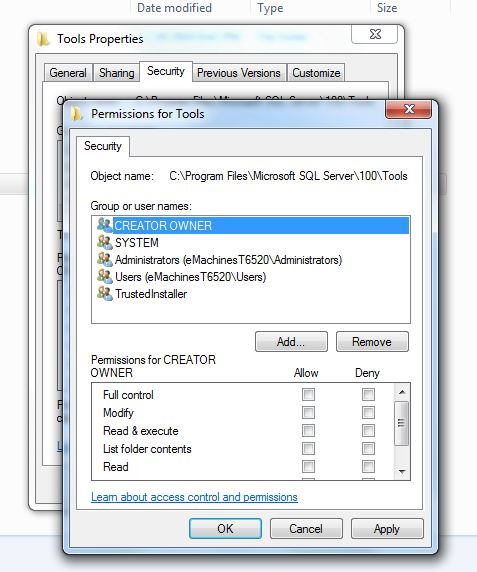
Here is how you can fix it in Windows 7. If you right-click on one of these bad directories to view Properties and try to open the Security tab, you will get the following message:


The permissions on Tools are incorrectly ordered, which may cause some entries to be ineffective.
After closing the dialog, you can press the Edit... button, which requires Administrator credentials.


A similar dialog box as the original message will appear, except this time you will have the opportunity to fix the problem. Press the Reorder button.


This will fix the DACL and take you back to the Properties window.


Thursday, May 13, 2010

Installation Problem with PerfectDisk 10

While I have been very happy with our Win7 upgrades, I have had a nagging problem with one of my applications on this 64-bit computer, namely, my PerfectDisk 10 defragging software. I have used PerfectDisk for years and really like it. However, when I ran the Win7 installer, PerfectDisk was the only application I had in Vista that it said I had to completely uninstall first. In fact, even after I uninstalled it, the Win7 installer wasn't happy - it even wanted all folders removed in the Program Files folder. So that was fine, I did all that.

After running the upgrade from Vista to Win7, I ran into problems installing PerfectDisk 10.

Error 1402. Could not open key:
UNKNOWN\Components\DF0B6CEA0A4B4AA4E8A0436BEF7EADA3\9DC837B7701D7C84E856E266933AC9D8. Verify that you have sufficient access to that key, or contact your support personnel.


After I fixed this problem, as I explain below, I repeatedly got this error on different subkeys in the Registry. What the key names all had in common was the subkey 9DC837B7701D7C84E856E266933AC9D8, which is the Windows installer Product ID for PerfectDisk.

That UNKNOWN\Components part of the error above is actually the Registry key

HKEY_LOCAL_MACHINE\SOFTWARE\Microsoft\Windows\CurrentVersion\Installer\UserData\S-1-5-18\Components

and the all of the Components entries are the various EXE's and DLL's it installs with it. For some reason, all of these Components subkeys for PerfectDisk became inaccessible after the Win7 upgrade. What SHOULD have happened was that the PerfectDisk uninstall should have removed these keys. Something went wrong though, of which I was unaware.

Anyway, as I tried to examine this Registry entry above, I was able to look at the

Components\DF0B6CEA0A4B4AA4E8A0436BEF7EADA3

key but not the

Components\DF0B6CEA0A4B4AA4E8A0436BEF7EADA3\9DC837B7701D7C84E856E266933AC9D8

key, even when I was logged in as Administrator.


9DC837B7701D7C84E856E266933AC9D8 cannot be opened. An error is preventing this key from being opened.
Details: Access is denied.

Hmmmm... something is amiss here. When I right-clicked Permissions...


I got this error:


You do not have permission to view the current permission settings for 9DC837B7701D7C84E856E266933AC9D8, but you can make permission changes. Um, OK.

Thankfully, after this error, RegEdit continued on to let me make changes to the permissions. When I got there, this is what it looked like - totally empty.


I tried all kinds of things but RegEdit wouldn't let me apply the changes because I didn't have permission (but could change the permissions, as it already told me earlier).

So I clicked on the Advanced button to look at other properties of this key, and noted that the owner of the key was corrupted. Probably the SID of a former user in Vista that was no longer valid in Win7.


So I clicked on the Adminstrators group to make Administrators the owner of the entry. If you don't see Adminstrators, you can click on the Other users or groups... button and add it manually.

After I clicked OK to go back to the previous dialog, I saw this:


Now that Adminstrators were the owner of the entry, I could add Administrators to the permissions for the key. To do that I clicked the Add... button and entered the Administrators group.


After I clicked OK to get back to the previous dialog, I gave Full Control to the Administrators.


Now, what Windows really wants is that SYSTEM be the owner of the key. Now that Administrators has full ability to update this key, I went back to the Advanced permissions on the key to set the owner again. Note that this two-step sequence is necessary. RegEdit wouldn't let me set SYSTEM as the owner the first time.


Since SYSTEM doesn't show up in the list of users to set the owner to, I had to add it manually. So I clicked the Other users or groups... button and added SYSTEM and pressed OK.


Now SYSTEM was in the list and was the highlighted new owner.


I pressed OK again to get back to the original Permissions dialog, then pressed OK again to close that dialog and get back to the main RegEdit screen. Now when I clicked on the subkey, it displayed as expected.


I had to search Components and repeat this procedure for every occurrence of the subkey 9DC837B7701D7C84E856E266933AC9D8. Hopefully this will help you when you are facing the same trouble.

Monday, May 10, 2010

Windows 7 Upgrades

It's been awhile since I've checked in. Things have been crazy busy at work and at home. Homewise, we are a family with three teenagers. Enough said there. Workwise, our company is weathering the recession just fine, thank you. We have a waiting list for customer installs (and no, we do not produce shrinkwrap software). It's a nice position to be in, of course, but the work pace is relentless.

In the last couple of months I have upgraded all of our home computers to Windows 7. This consisted of upgrading one Vista64 desktop and two WinXP32 laptops. I bought all of the software on eBay in the $50-70 range.

The experience went very well. The only upgrade path for XP computers is to do a fresh install of the OS. This requires all of your software to be reinstalled after the upgrade. But the installer copies all of the current folders into a new folder so there is no need to worry about it wiping the drive or reformatting. All of your files are still there. You would need to watch out, though, if you have data that you will need to export before the upgrade, such as email (including rules!), SQL data, source control, etc. If your data is flat files, no worry, they will be there, otherwise be very careful... Also, if there are multiple user accounts you need to make sure you get all of the data exported for the others, too. The fresh OS upgrade is very quick, since it only installs the OS files and lays down a new Registry. The most work it needs to do is to identify and install drivers needed for your hardware.

On the Vista box, I chose to upgrade it rather than install a fresh OS. It seemed to go OK, but was very slow. I'm talking several hours, like 5 or 6. In retrospect, I would do the fresh install. I am still considering doing that, even now. The reason I didn't is for the reasons I mentioned above: email, SQL data, source control databases, and settings configurations in various applications that would need to be exported and saved.

Overall, I highly recommend Win7 for everyone. It has an outstanding user experience.

For comparisons, here are examples of vanilla Vista and Win7 desktops.


This is an example of the Windows 7 installer screen.