Thursday, December 30, 2010

Digital Cable Advisor

This month we finally made the switch at home from analog cable TV to digital cable. I have been using Windows Media Center for years, since the old XP Media Center days, and have really enjoyed watching TV and recording movies to DVD's.

But now we have a new hi-def TV, Blu-ray DVD, streaming Netflix, etc. I took one of our old DVD's recorded from analog cable TV and it looks HORRIBLE on our new TV. So now I'd like to make the switch on our home computer to digital TV.

You can buy a modern PC with a digital TV tuner already installed. But you can also install a digital tuner in an existing computer PROVIDED that it meets the Media Center requirements for a digital tuner.

You MUST run Microsoft's Digital Cable Advisor from within Media Center to enable Media Center's digital cable functionality. See here for more information about it.

Unfortunately for me, our home computer doesn't cut it. While I could buy and install a new graphics card to replace the motherboard's integrated graphics, I only have two DDR memory slots and 2GB is as high as I can go. Maybe it's time to shop for a new motherboard.


SQL Server 2008 R2 Express Repair Problem

Yesterday, I blogged about the DACL problems that I had with my new SQL Server 2008 R2 Express installation. I thought after fixing those problems that everything would be OK. As it turned out, the installation wasn't healthy and I decided to run a Repair on it.

I started the installation again, and chose the Repair option under the Maintenance section. The install ran for awhile but eventually I got an error that said


Error 1316.A network error occurred while attempting to read from the file e:\367ede46587e326a4067cebb84442e\1033_ENU_LP\x64\setup\SSCERuntime_x86-enu.msi

This error ultimately caused the Repair to fail.


Googling this error led to a Microsoft Knowledge Base article indicating that this has been a known problem with SQL Server Repairs since 2009. The gist of it is that there is an .msi file having two different names between the SQL Server install and the Visual Studio 2008 SP1 install. The solution is to uninstall the SQL Server 3.5 Compact Edition, then run the SQL Server Repair, which will also reinstall it again.


After uninstalling the four Compact Edition applications that I highlighted above, I reran the Repair. This time it completed without a problem and my SQL Server runs just fine.


Wednesday, December 29, 2010

SQL Server Setup DACL Problem

Just got done installing SQL Server 2008 R2 Express on my Windows 7 development computer. It was an upgrade to SQL Server 2008 Express that installed with my Visual Studio 2010. At the end of the install, the summary noted that there had been an error.


Setup has detected a non canonical discretionary access control list (DACL) on directory 'C:\Program Files\Microsoft SQL Server\100\COM'. Please verify your security settings and make corrections if needed.
With a little googling I learned that this is repairable from Windows Explorer. Interestingly, the COM directory mentioned in the error message was actually OK, but there were 2 peer directories that did in fact have the DACL problem.

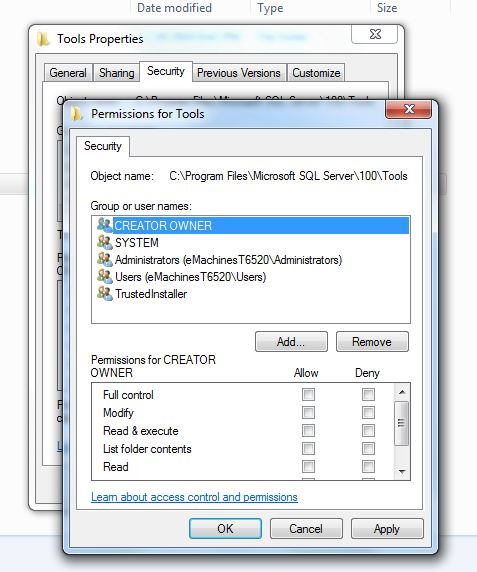
Here is how you can fix it in Windows 7. If you right-click on one of these bad directories to view Properties and try to open the Security tab, you will get the following message:


The permissions on Tools are incorrectly ordered, which may cause some entries to be ineffective.
After closing the dialog, you can press the Edit... button, which requires Administrator credentials.


A similar dialog box as the original message will appear, except this time you will have the opportunity to fix the problem. Press the Reorder button.


This will fix the DACL and take you back to the Properties window.


Friday, November 12, 2010

.NET Reflector Won't Integrate with VS 2008

I'm trying to integrate Red Gate's .NET Reflector v6.5.0.135 into my VS 2008 installation. It's supposed to work but it doesn't allow me to select my VS. Don't know what is up with that yet. When I figure this out I'll post about it. If you have figured this out please leave a comment.

Sunday, May 23, 2010

Ctrl+Click to Follow Link in Visual Studio

Yesterday, I had an accident on my mountain bike and ended up in the ER. Besides cuts and road rash, I also sprained my left shoulder, which is now in a sling. The sprain causes unbearable pain whenever I try to move my left arm. So, I am typing this with only my right hand, a new experience in itself.


I have dusted off an old Visual studio project to play with today. In one of the C# source files, I have a comment with a web link in it to refer to a website with more information.


In order to follow the link, you have to hold the Ctrl key down, then click on the link with your mouse. Go ahead and give that a try, using only your right hand! In all the years I've used VS, I've never considered this a usability issue before.

Someday, I will be healed up. But I won't forget this lesson in usability. Perhaps all software developers should go through an exercise where they are temporarily handicapped in some way and be forced to use their software. Could be enlightening.

Thursday, May 13, 2010

Installation Problem with PerfectDisk 10

While I have been very happy with our Win7 upgrades, I have had a nagging problem with one of my applications on this 64-bit computer, namely, my PerfectDisk 10 defragging software. I have used PerfectDisk for years and really like it. However, when I ran the Win7 installer, PerfectDisk was the only application I had in Vista that it said I had to completely uninstall first. In fact, even after I uninstalled it, the Win7 installer wasn't happy - it even wanted all folders removed in the Program Files folder. So that was fine, I did all that.

After running the upgrade from Vista to Win7, I ran into problems installing PerfectDisk 10.

Error 1402. Could not open key:
UNKNOWN\Components\DF0B6CEA0A4B4AA4E8A0436BEF7EADA3\9DC837B7701D7C84E856E266933AC9D8. Verify that you have sufficient access to that key, or contact your support personnel.


After I fixed this problem, as I explain below, I repeatedly got this error on different subkeys in the Registry. What the key names all had in common was the subkey 9DC837B7701D7C84E856E266933AC9D8, which is the Windows installer Product ID for PerfectDisk.

That UNKNOWN\Components part of the error above is actually the Registry key

HKEY_LOCAL_MACHINE\SOFTWARE\Microsoft\Windows\CurrentVersion\Installer\UserData\S-1-5-18\Components

and the all of the Components entries are the various EXE's and DLL's it installs with it. For some reason, all of these Components subkeys for PerfectDisk became inaccessible after the Win7 upgrade. What SHOULD have happened was that the PerfectDisk uninstall should have removed these keys. Something went wrong though, of which I was unaware.

Anyway, as I tried to examine this Registry entry above, I was able to look at the

Components\DF0B6CEA0A4B4AA4E8A0436BEF7EADA3

key but not the

Components\DF0B6CEA0A4B4AA4E8A0436BEF7EADA3\9DC837B7701D7C84E856E266933AC9D8

key, even when I was logged in as Administrator.


9DC837B7701D7C84E856E266933AC9D8 cannot be opened. An error is preventing this key from being opened.
Details: Access is denied.

Hmmmm... something is amiss here. When I right-clicked Permissions...


I got this error:


You do not have permission to view the current permission settings for 9DC837B7701D7C84E856E266933AC9D8, but you can make permission changes. Um, OK.

Thankfully, after this error, RegEdit continued on to let me make changes to the permissions. When I got there, this is what it looked like - totally empty.


I tried all kinds of things but RegEdit wouldn't let me apply the changes because I didn't have permission (but could change the permissions, as it already told me earlier).

So I clicked on the Advanced button to look at other properties of this key, and noted that the owner of the key was corrupted. Probably the SID of a former user in Vista that was no longer valid in Win7.


So I clicked on the Adminstrators group to make Administrators the owner of the entry. If you don't see Adminstrators, you can click on the Other users or groups... button and add it manually.

After I clicked OK to go back to the previous dialog, I saw this:


Now that Adminstrators were the owner of the entry, I could add Administrators to the permissions for the key. To do that I clicked the Add... button and entered the Administrators group.


After I clicked OK to get back to the previous dialog, I gave Full Control to the Administrators.


Now, what Windows really wants is that SYSTEM be the owner of the key. Now that Administrators has full ability to update this key, I went back to the Advanced permissions on the key to set the owner again. Note that this two-step sequence is necessary. RegEdit wouldn't let me set SYSTEM as the owner the first time.


Since SYSTEM doesn't show up in the list of users to set the owner to, I had to add it manually. So I clicked the Other users or groups... button and added SYSTEM and pressed OK.


Now SYSTEM was in the list and was the highlighted new owner.


I pressed OK again to get back to the original Permissions dialog, then pressed OK again to close that dialog and get back to the main RegEdit screen. Now when I clicked on the subkey, it displayed as expected.


I had to search Components and repeat this procedure for every occurrence of the subkey 9DC837B7701D7C84E856E266933AC9D8. Hopefully this will help you when you are facing the same trouble.

Monday, May 10, 2010

Windows 7 Upgrades

It's been awhile since I've checked in. Things have been crazy busy at work and at home. Homewise, we are a family with three teenagers. Enough said there. Workwise, our company is weathering the recession just fine, thank you. We have a waiting list for customer installs (and no, we do not produce shrinkwrap software). It's a nice position to be in, of course, but the work pace is relentless.

In the last couple of months I have upgraded all of our home computers to Windows 7. This consisted of upgrading one Vista64 desktop and two WinXP32 laptops. I bought all of the software on eBay in the $50-70 range.

The experience went very well. The only upgrade path for XP computers is to do a fresh install of the OS. This requires all of your software to be reinstalled after the upgrade. But the installer copies all of the current folders into a new folder so there is no need to worry about it wiping the drive or reformatting. All of your files are still there. You would need to watch out, though, if you have data that you will need to export before the upgrade, such as email (including rules!), SQL data, source control, etc. If your data is flat files, no worry, they will be there, otherwise be very careful... Also, if there are multiple user accounts you need to make sure you get all of the data exported for the others, too. The fresh OS upgrade is very quick, since it only installs the OS files and lays down a new Registry. The most work it needs to do is to identify and install drivers needed for your hardware.

On the Vista box, I chose to upgrade it rather than install a fresh OS. It seemed to go OK, but was very slow. I'm talking several hours, like 5 or 6. In retrospect, I would do the fresh install. I am still considering doing that, even now. The reason I didn't is for the reasons I mentioned above: email, SQL data, source control databases, and settings configurations in various applications that would need to be exported and saved.

Overall, I highly recommend Win7 for everyone. It has an outstanding user experience.

For comparisons, here are examples of vanilla Vista and Win7 desktops.


This is an example of the Windows 7 installer screen.

Monday, October 12, 2009

New Gigabit NIC

A couple of weeks ago I installed a new NIC in my aging emachines box. The computer has an integrated 100 mbit NIC on the mobo which has been working just fine, but I have recently been upgrading my equipment to gigabit. My new D-Link DIR-855 Wireless N/gigabit router is the new core of our home network. Our 1 TB Buffalo TeraStation supports 1 gbit links, and now my main computer also does. I really wanted this to speed up my Ghost backups to the TeraStation.

It took a long time for me to decide which NIC to get for my PCI Express mobo. After a bunch of research, I finally decided on the D-Link DGE-560T. There are conflicting reviews out there on its worth, but I decided its cost was low enough that I could afford to take a chance.

Happily, the card has been working well, and after disabling the integrated NIC in the BIOS, it really was plug-n-play, even on this Vista 64 box. I did have one problem after the install, which was that the security rights got screwed up on a Windows system folder. I figured out how to solve that, though, and blogged about it here.

Here's a picture of the NIC. It is very small, smaller than I expected. The card edge occupies just a small portion of the PCI Express slot on the mobo.


Wednesday, September 30, 2009

Finally Figured Out My Vista Problem

Wow I have found the solution to a problem that I have had intermittently since installing Vista 64. Sometimes after upgrading my computer, my VPN connection would become inaccessible and my Ghost service would quit working (see A Painful Lesson and Fragile Vista). Tonight, I got bit by this again after installing a gigabit network card in my computer.

A natural thing to do when you get errors is to go look in the Windows event log to see if there are any messages. But when I tried to open the Event Viewer, I got this message:

Event log service is unavailable. Verify that the service is running.


Well, in fact, the Windows Event Log service was not running, and attempts to start it gave the error:

Error 4201: The instance name passed was not recognized as valid by a WMI data provider

So, I did some Binging and found a tip to check the permissions on the C:\Windows\System32\LogFiles\WMI\RtBackup folder. It didn't look good. They didn't at all match the permissions on its WMI parent folder. What it had was just my user name, and what the parent had were several system accounts.


I removed my account and added the system accounts to match the parent folder.


After rebooting, everything was back to normal again. I have no idea why certain installs mess up the permissions. Hopefully, this will be useful info for someone experiencing this problem.

Tuesday, September 29, 2009

Automating Excel from C# Pt. 1

Recently, I have wanted to convert Excel spreadsheets to CSV files for further processing. Excel provides a COM Automation model for using its functionality from 3rd party applications.

One of the things about COM Automation is that if you don't close all of the handles you are using in the application being automated, orphaned instances can be left running and they will never quit unless you use Task Manager to kill them or reboot the computer.

So, the automating application needs to be very careful to get rid of everything it is referencing in the automated process to allow it to shut down. The problem is, .NET is a garbage-collected environment, and this means that objects are destroyed, or released, whenever the framework decides that memory should be freed up. Unlike C++ destructors, which are always called immediately when a variable goes out of scope or is delete'd, .NET finalizers are called only when the framework wants to free memory. Exactly when that happens cannot be known with certainty. Oh, objects will be released eventually, but not necessarily when the application might like.

Therefore, the .NET framework provides the IDisposable interface, which allows the non-.NET allocated portions of an object to be immediately freed without the .NET portion being freed. This is what we need to use when automating COM so that COM handles are released in a controlled, dependable, and timely fashion.

In the next part to this series, I will talk about the IDisposable interface.

Tuesday, September 22, 2009

Multiple vs. Single Exit Points

Recently in one of the newsgroups a side discussion came up about the benefits of a single exit point from a function. There was a time when I followed that notion very closely. However, I found that the functions ended up having more nesting and other logic to "jump over" code paths once the return value was determined. In recent years I have found myself pretty much ignoring that idea completely.

Here is an example of some actual code I have somewhere. I have removed the null-checks, comments, and other exception throws to get down to the core of the logic.

In this snippet you can see that once the return value is determined, it immediately returns it.

    1 private int CompareTokens(CommandLineParser commandLineParser)
    2 {
    3     var n = System.Math.Min(this.tokens.Length, commandLineParser.tokens.Length);
    4 
    5     for (var i = 0; i < n; i++)
    6     {
    7         var result = this.tokens[i].CompareTo(commandLineParser.tokens[i]);
    8         if (result != 0)
    9         {
   10             return result;
   11         }
   12     }
   13 
   14     if (this.tokens.Length < commandLineParser.tokens.Length)
   15     {
   16         return -1;
   17     }
   18 
   19     if (this.tokens.Length > commandLineParser.tokens.Length)
   20     {
   21         return +1;
   22     }
   23 
   24     return 0;
   25 }

In the next snippet I have refactored the original routine into a single exit point. Note the required variable for the return value in line 3, the break at line 12 and the extra logic at lines 16 and 22 required to jump over the other code paths. Somewhere I know I have a more severe example. I will look for it. In fact, I remember it is an old one that used to have one exit point that I have since converted to multiple.

    1 private int CompareTokens(CommandLineParser commandLineParser)
    2 {
    3     var result = 0;
    4 
    5     var n = System.Math.Min(this.tokens.Length, commandLineParser.tokens.Length);
    6 
    7     for (var i = 0; i < n; i++)
    8     {
    9         result = this.tokens[i].CompareTo(commandLineParser.tokens[i]);
   10         if (result != 0)
   11         {
   12             break;
   13         }
   14     }
   15 
   16     if (result == 0)
   17     {
   18         if (this.tokens.Length < commandLineParser.tokens.Length)
   19         {
   20             result = -1;
   21         }
   22         else if (this.tokens.Length > commandLineParser.tokens.Length)
   23         {
   24             result = +1;
   25         }
   26     }
   27 
   28     return result;
   29 }

So, what's your opinion? I suppose some of you have seen coding horrors where multiple exit points have been abused.

Saturday, September 19, 2009

Consolas Font in Code Snippet Windows

I have the Consolas font issue fixed for my code snippet windows. If you have the Consolas font installed, the snippet windows should now show in that font. I haven't figured out the line ending problem yet, though.

    1 using System;
    2 using System.Collections.Generic;
    3 using System.Linq;
    4 using System.Windows.Forms;
    5 
    6 namespace Test1
    7 {
    8     static class Program
    9     {
   10         /// <summary>
   11         /// The main entry point for the application.
   12         /// </summary>
   13         [STAThread]
   14         static void Main()
   15         {
   16             Application.EnableVisualStyles();
   17             Application.SetCompatibleTextRenderingDefault(false);
   18             Application.Run(new Form1());
   19         }
   20     }
   21 }

The issue with the font was that the  <pre>  tags for the coloring on the fragments weren't inheriting the  font-family:consolas  that was specified in the style for the  <div>. Modifying the Copy Source As HTML utility settings remedied that.

So now my settings for CopyAsHTML are:


Friday, September 18, 2009

Posting Code Snippets to Blogger

I want to be able to post code snippets and I found a little utility that integrates with Visual Studio 2008 called CopySourceAsHtml. This utility lets you select source code in a code window and copy it verbatim to the clipboard, which can then be pasted into the blog.

In this shot, I selected some source code, and right-clicked. I then chose Copy As HTML...


When you do this, the utility's dialog box appears allowing you to choose options. I have set options on two of the tabs.


On the File Style tab, I have added some more style settings for the  <div>  that it creates for the snippet.  The  overflow:auto  setting will add scroll bars as needed, the  white-space:nowrap  setting will turn off word-wrapping, the  height:500px  setting sets the box height to 500 pixels, and the  border:inset silver  sets the box's border style to inset with silver color.

When you press OK the HTML is placed on the clipboard and is ready to paste into the blog post.


For this to work, I also had to make a change to my Blogger template, otherwise the word-wrapping setting was ignored and was always on.


This is the final result:

  296                 else if (path.EndsWith(":"))
  297                 {
  298                     path += @".\";
  299                 }
  300                 else if (!path.EndsWith(@"\"))
  301                 {
  302                     path += @"\";
  303                 }
  304 
  305                 path = System.IO.Path.GetFullPath(path);
  306                 if (path == null)
  307                 {
  308                     throw new System.ApplicationException("GetFullPath() returned NULL unexpectedly.");
  309                 }
  310 
  311                 if (fileType == FileTypes.File)
  312                 {
  313                     // Special cases for when x.txt is truly a FileInfo, this code
  314                     // must come after the GetFullPath() call above:
  315                     //      c:\x.txt\
  316                     //          Path: c:\x.txt\
  317                     //          File: 
  318                     //      c:\x.txt\.
  319                     //          Path: c:\x.txt\
  320                     //          File: .
  321                     //      c:\x.txt\.\.\.\\\.\.\..\x.txt\\\\\.\.\.\..\x.txt\.\
  322                     //          Path: c:\x.txt\
  323                     //          File: 
  324                     //      c:\x.txt\.\.\.\\\.\.\..\x.txt\\\\\.\.\.\..\x.txt\.\.
  325                     //          Path: c:\x.txt\
  326                     //          File: .
  327                     //      c:\x.txt\.\.\.\\\.\.\..\x.txt\\\\\.\.\.\..\x.txt\.\.\\\
  328                     //          Path: c:\x.txt\
  329                     //          File: .
  330                     if (((fileName == string.Empty) || (fileName == ".")) &&
  331                         path.EndsWith(@"\"))
  332                     {
  333                         fileSpec = path.Substring(0, path.Length - 1);  // Make the new filespec be the earlier resolved Path minus the trailing \
  334                         path = System.IO.Path.GetDirectoryName(fileSpec);
  335 
  336                         if (path == null)
  337                         {

One thing I note is that you cannot easily copy text out of this window, because it doesn't have normal line ends. I am looking into how to remedy that. I do plan to post downloadable code when I post snippets. The other thing is that this is displaying with a Courier font, rather than Consolas as in Visual Studio.

Wednesday, September 16, 2009

I Have Perforce Source Control Now

I had been wanting to get source control for my home hobby projects for the last couple of months. I am most familiar with Visual SourceSafe since I first used it 14 years ago (We use Team System now at work). I've been following eBay auctions to try to get VSS cheap, like say $50, but I hadn't had any takers for this price. Thankfully, I gave up on the stupid VSS idea, and after some research decided to give Perforce a try. It is free for up to two users, which is exactly the price I wanted to pay. It also integrates with Visual Studio 2008. Of all of the components on their download page, I only downloaded and installed these three 64-bit ones:
  • P4D: Server
  • P4V: Visual Client
  • P4SCC: SCC Plug-in

The installs went smoothly. It wanted me to reboot, which I did. After rebooting, I went into the Perforce Visual Client P4V utility, then on the Tools / Administration menu I set myself up as a superuser. I accepted all of the defaults for everything, including the Workspace, which ended up being a problem later. I fired up Visual Studio and opened a solution that I wanted to add to source control. After opening the solution, I enabled the Source Control toolbar and selected Change Source Control.


This is where I ran into the only problem I had. When I tried to bind the solution to source control I got this error:

Path 'd:\Source\XLStoCSV/*' is not under client's root 'C:/Users/Alan/Perforce/EMACHINEST6520_1666/Alan_eMachinesT6520'.


I have a root folder where all of my programming projects are and figured that the problem was that I needed to make this be the root in source control. It was a little unclear how to do that though, but after some snooping around in P4V I found that I could edit the Workspace.


Earlier, I had accepted all of the defaults when setting Perforce up. I should have specified d:\source for my root.


After making this change, I went back to Visual Studio and retried binding the solution to source control. This time it worked just fine.


One more dialog came up to ask what to do if the files were already in source control. They weren't, of course, and I just took the default.


At this point, the icons on the project items were marked with the familiar yellow plus signs and could be checked in. Here's a screenshot of everything checked in. Elapsed time from download: 20 min. Very cool!

Saturday, September 12, 2009

StyleCop 4.3.2.1

Just noticed tonight that StyleCop 4.3.2.1 was released a month ago. Bug fixes are always welcome. Plus they've added the ability to suppress warnings on a per-unit basis, like FxCop.

Wednesday, September 9, 2009

Error Updating Norton Ghost

Since I hadn't ever updated Norton Ghost since I originally installed it, I thought it would be a good idea to see if there were any updates for it. Norton Ghost comes with the Norton Live Update utility, which I ran. It told me that there were indeed updates for it, so I told it to go ahead and update it. After the updater ran for awhile, I eventually got this error:


Fatal error during installation.

Nice. How informative. At this point, Ghost is UNINSTALLED, and needs to be reinstalled from the media. You would think that with all the ridicule vendors get from The Daily WTF and similar sites, the developers would know better than to give a message like this. I tried installing several times without any luck.

One day, by accident, I had forgotten and left the original install CD in the drive and ran Live Update again. I noticed that the updater was spinning up the CD drive and reading from it. This time, the updater completed successfully.

Lesson learned: The Norton Ghost updater wants the original media in the drive during the upgrade.